 Formidable Studio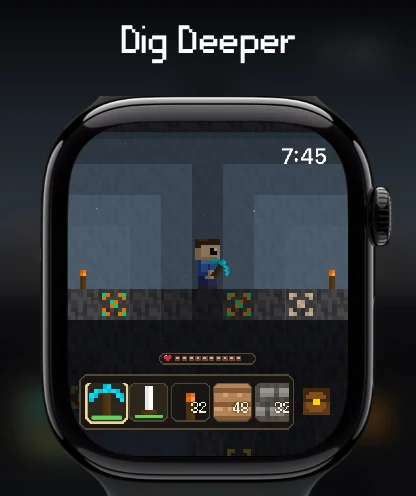
Start a world on your watch
Install WatchBlocks from the App Store, then open it on Apple Watch. The game runs natively on the watch, so you do not need an iPhone nearby for solo play. Check the App Store listing for current device and operating-system requirements before downloading.
Choose Survival if you want to gather resources, manage health and food, and defend yourself. Choose Creative to experiment with building and unlimited resources. The controls below cover the 2D game; 3D Creative has its own movement and camera controls.
Apple Watch controls
- Move: use the on-screen joystick. If you prefer dragging on the world, turn off Joystick in Settings.
- Jump: use the jump button, or swipe up on the world when the jump button is hidden.
- Choose an item: select it in the hotbar. Scroll the hotbar to reach slots that do not fit on the screen.
- Use the Digital Crown: its action depends on your settings and the screen you are using. In 2D, the Digital Crown setting lets you choose movement, zoom, or cycling hotbar items.
- Mine: choose Tap or Hold under Mining Mode in Settings. Tap mining lets you select a block to break; hold mining gives you continuous control while pressing. With the joystick hidden, drag-to-move uses tap mining.
- Build: select a block in the hotbar, then tap a valid space in reach to place it.
Try movement and mining on flat ground first. If a control behaves differently, check your input settings before restarting the game. On iPhone and iPad, the larger touch interface provides the same core mining, inventory, and building actions.
Gather, craft, and build your first shelter
- Collect wood. Start with nearby trees and gather basic materials before heading underground.
- Open crafting. Read the recipe’s required materials, gather what is missing, and craft the tools you can make. A workbench gives you a place to expand your crafting.
- Practice building. Select a building block and place a short floor and walls. Leave room for a door and storage.
- Prepare for night. Gather food and make a small, lit shelter. Survival includes hunger, hostile creatures, and a day-and-night cycle.
- Explore gradually. Bring tools and food when you start mining stone and ore. Return to your base before pushing deeper into unfamiliar terrain.
Hold an inventory item to read its description. Use the in-game recipe list as the source for exact ingredients; recipes and available materials can change between releases.
Worlds, Creative, and Full Access
WatchBlocks is free to download with a three-day trial of the complete game. After the trial, free players can keep up to three saved Survival worlds and try Creative without saving. The optional Full Access purchase includes unlimited worlds, saved Creative worlds, custom worlds and skins, mod creation, Watch Console, and 3D Creative.
Full Access is a one-time purchase, with no subscription. See the current pricing and access details; App Store prices vary by region.
Your worlds can sync through iCloud across your Apple devices. Use the same Apple account with iCloud available when continuing a world on another device. World syncing and joining a friend’s multiplayer session are separate features.
When you need help
If an action does not work, check the selected item, whether the target is in reach, and your current game mode and input settings. For connection problems, follow the multiplayer setup and troubleshooting guide.
For a bug report, email formidablegamesstudio@gmail.com with your device, operating-system version, WatchBlocks version, and the steps that caused the problem.